
Best Online Piano Lessons (2026): 8 Courses a Piano Teacher Recommends
The best online piano lessons for adults, kids and beginners, compared by a piano teacher: real prices, free trials, live teachers and a 30-second quiz.
On this page
Picking online piano lessons is easy to get wrong in a very specific way: you sign up for the app with the flashiest ad, quit after six weeks, and blame yourself instead of the mismatch. I've taught piano since 2001, and many of the adults who come to me "starting over" already tried an app or a course first. The problem usually wasn't effort. It was choosing a tool built for a different kind of learner.
This guide fixes that. Below are the 8 online piano lessons and courses I'd actually recommend in 2026, plus the best picks for kids, live teachers, advanced players and free learning. Every price was checked on the company's own site on October 31, 2026, and a 30-second quiz matches you to the right one.
Quick answer
What are the best online piano lessons?
For most adult beginners, the best online piano lessons are Pianoforall: try it free for 7 days, then pay $49 once for lifetime access, with a 60-day money-back guarantee. It starts you on chords, so real songs come early. The catch is that nothing listens to you play. For an app that hears every note, choose Skoove or Flowkey ($149.99 a year each). To learn to read music, pick Piano Marvel (free plan, or $129.99 a year). For kids, Simply Piano. For a real teacher, live online lessons start at about $20 for 30 minutes. Not sure? Take the 30-second quiz.
Course finder
Which online piano course fits you?
Seven quick questions, about 30 seconds. Every answer is a piano key, so turn your sound on if you like.
How this quiz scores: each answer gives points to the courses that fit it, and the most points wins. Pianoforall is our top pick and an affiliate partner, so it starts with 1 point and wins ties. Any of the 8 courses can win, and your result shows every course’s score.
- Best for adults: Pianoforall
- Best for kids and game-style practice: Simply Piano
- Best for sight-reading and exam prep: Piano Marvel
- Best guided path of popular songs: Playground Sessions
- Best for instant note feedback on a budget: Skoove
- Best video-lesson library: Pianote
- Best for a huge song library: Flowkey
- Best for visual learners: Piano by Pictures
The 4 types of online piano lessons
"Online piano lessons" covers four very different things, and choosing the right type matters more than choosing the right brand:
- Apps that listen (Simply Piano, Skoove, Flowkey, Piano Marvel, Playground Sessions). They hear you through your device's microphone or a MIDI cable and react instantly. Best for daily practice and motivation.
- Video courses (Pianoforall, Pianote, Piano by Pictures). Step-by-step lessons you watch and copy at your own pace. Best for understanding how music works.
- Live online teachers (for example, Online Piano Teachers). A real teacher on a video call. Best for technique, posture and accountability.
- Free resources (Hoffman Academy, YouTube channels). Great extras, but there's no plan and no feedback.
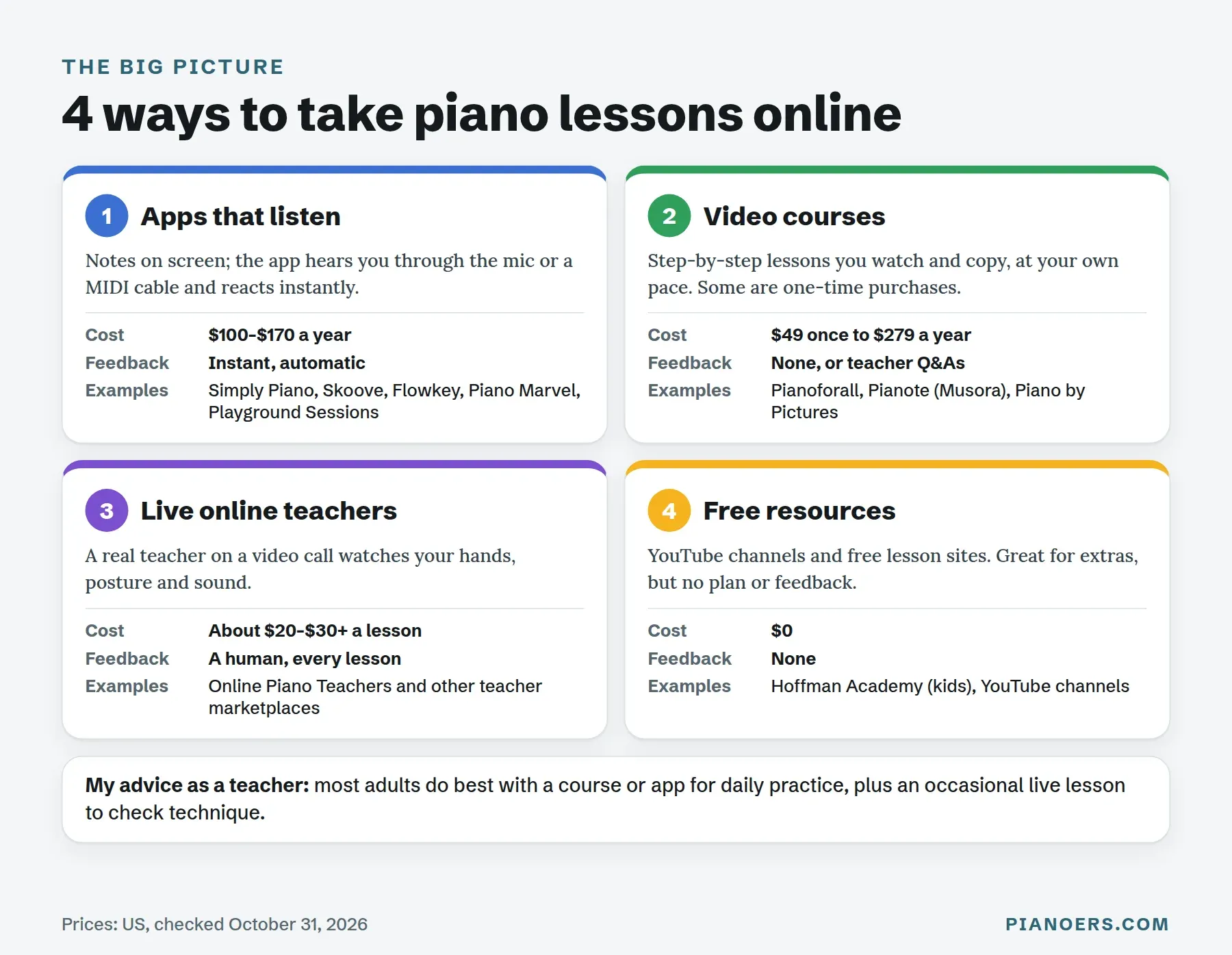
Most of my adult students do best with a mix: a course or app for daily practice, plus an occasional live lesson to check technique. I call it the hybrid plan, and it's the best value in online piano lessons.
Best online piano lessons compared
| Course | Type | Price (US) | Free trial | Feedback | Best for |
|---|---|---|---|---|---|
| Pianoforall | Video course | One-time: $49 | 7 days free; 60-day guarantee | None automatic (email questions) | Adults who want songs fast |
| Simply Piano | App | Monthly: $17.90; Yearly: $169.90 | Yes (shown in the app) | Listens through the mic | Kids and game-style practice |
| Piano Marvel | App | Free plan: $0; Monthly: $17.99; Yearly: $129.99 | Free plan | Scores your playing | Sight-reading and exams |
| Playground Sessions | App | Monthly: $19.99; Yearly: $149.99; Lifetime: $219.99 to $349.99 | Shown after sign-up | Scores your playing | A guided path of popular songs |
| Skoove | App | Free plan: Basic; Monthly: $29.99; Yearly: $149.99 | Yes | Hears notes and timing | Note feedback on a budget |
| Pianote (Musora) | Video course | Monthly: $30; Yearly: $279 | 7 days; 90-day guarantee | Teacher support, live Q&As | A deep video library |
| Flowkey | App | Free account; Monthly: $24.99; Yearly: $149.99 | 7 days on yearly plans | Wait Mode listens | Popular songs, any piano |
| Piano by Pictures | Video course | First month: free; Monthly: $49 | First month free | None stated | Visual learners |
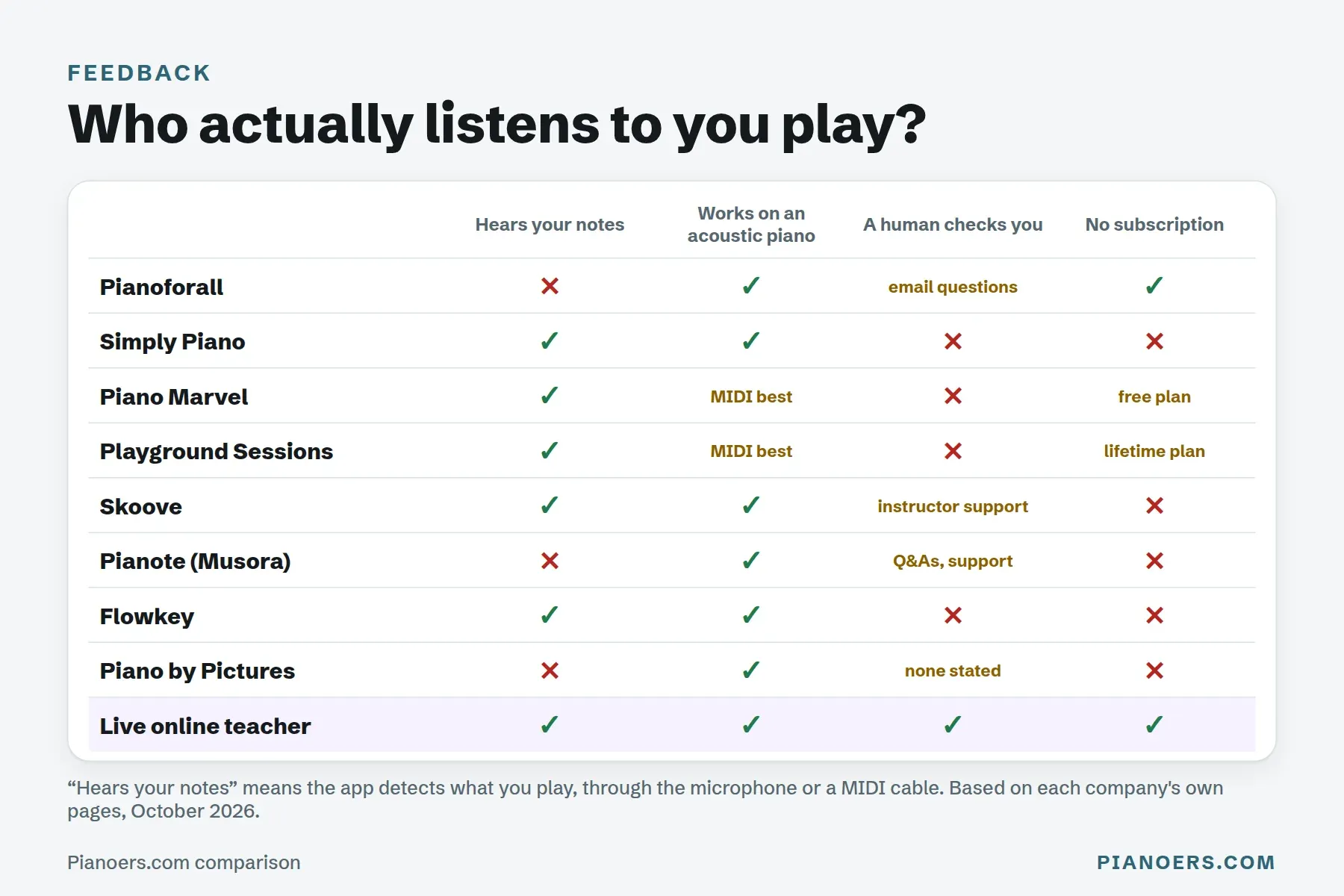
The biggest practical difference between these is who listens to you play. That decides whether you get corrected in the moment, later, or never:
The 8 best online piano lessons and courses, reviewed
These are in my recommended order for a typical adult beginner. If you're shopping for a child, an exam or a specific style, jump to the best picks by goal.
30-second chord taste
Play your first chord: C major
Press C, then E, then G, then hear all three together. That one hand shape is the start of the chord-first idea: learn a few shapes and you can play along with real songs long before you can read a page of notes.
A taste of the chord-first approach, made by Pianoers. It isn’t a lesson from Pianoforall itself.
The three dotted keys make a C major chord: C, E and G.
Pianoforall: best online piano course for adult beginners
Verdict: The best value for adult beginners: a chord-first course you can try free for 7 days, then $49 once, with a 60-day money-back guarantee. Choose something else only if you need an app that hears your notes or a teacher on call.
- Price:
- One-time $49.
- Trial:
- 7 days free, plus a 60-day money-back guarantee.
- Format:
- Video, audio and ebooks.
- Feedback:
- None automatic; email questions.
- Works with:
- Any piano; PC, Mac, iOS, Android, offline.
What I like
- You’ll play recognizable songs quickly
- The style range (pop, blues, jazz, classical) is wider than most competitors
- It’s extremely affordable next to a $25–$30 monthly subscription
Drawbacks
- There’s no live feedback loop, so you won’t know if your timing is off unless you record yourself
- The video and audio production feels plain next to newer apps
Pianoforall prices (US):
- Free trial: 7 days
- One-time price: $49 for lifetime access (normally $79)
- Money-back guarantee: 60 days
Why it's my top pick for adults: Pianoforall is a one-time payment, not a subscription, and that alone puts it in a different category from most of this list. According to Pianoforall's own site, you get 568 lessons across a set of interactive ebooks with built-in video and audio, covering rhythm piano, ballads, blues, jazz and classical. The company also says it has helped over 500,000 students, and that the course works on PC, Mac, iOS and Android, including offline.
The method is the real selling point. Instead of drilling exercises for months before you touch a real song, you learn a handful of chord shapes and rhythm patterns and start playing recognizable music almost immediately. That's exactly the hook that works on adults who quit lessons as kids because nothing sounded like music for the first year. Reading music is introduced as you go, alongside playing by ear.
The honest catch: nothing listens to you. Record yourself every week or two to check your timing, or add a monthly check-in with a live teacher. My full Pianoforall review goes book by book.
Simply Piano: best piano app for kids and game-style practice
Verdict: The most fun way to build a daily practice habit, and my pick for kids. Adults paying for themselves get less for the money, as my full review explains.
- Price:
- Monthly $17.90 · Yearly $169.90.
- Trial:
- Free trial.
- Format:
- Game-style app.
- Feedback:
- Listens through the mic.
- Works with:
- Any piano or keyboard; iOS, Android.
What I like
- It’s fun and motivating
- The song selection is wide
- It’s a solid fit for casual learners who want progress without much structure
Drawbacks
- It’s subscription-only
- Serious students will outgrow the depth within a year or two
Simply Piano, made by Simply (the company formerly called JoyTunes), listens through your device's microphone on any piano or keyboard and reacts to every note. It mixes classical pieces, chart hits and Disney songs, and adds personalised exercises as you progress. The Family plan covers up to 5 profiles and all the Simply apps.
Simply Piano prices (US):
- Monthly plan: $17.90 a month
- Yearly plan: $169.90 a year
- Family monthly plan: $23.90 a month
- Family yearly plan: $209.90 a year
This is the one I recommend to parents of a distractible 10-year-old. The gamification genuinely works, and in the first few months the biggest risk isn't bad technique, it's quitting. For adults paying for themselves, the value is weaker; my Simply Piano review explains why.
Piano Marvel: best for sight-reading and exam prep
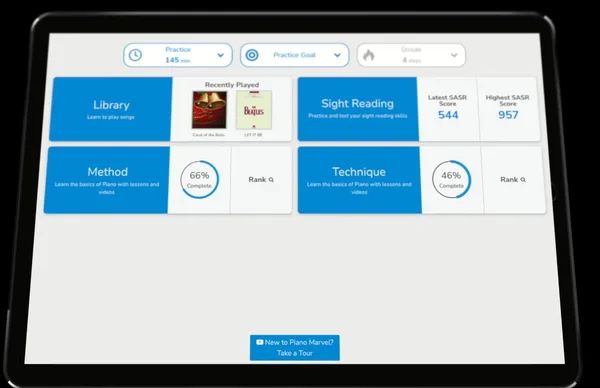
Verdict: The one to choose for sight-reading and exam prep, with a free tier generous enough to try it properly.
- Price:
- Free plan · Monthly $17.99 · Yearly $129.99.
- Trial:
- Free tier.
- Format:
- Method course and song library.
- Feedback:
- Scores your playing.
- Works with:
- Best with a MIDI cable; iOS, Android, Windows, Mac.
What I like
- It works for all skill levels
- The sight-reading tools are unmatched on this list
- There’s a genuinely usable free tier
Drawbacks
- The interface isn’t the sleekest
- It works best with a MIDI keyboard connected, not just a mic
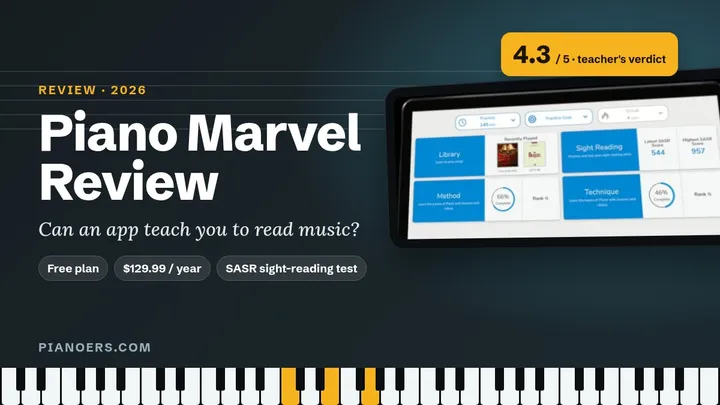
Piano Marvel has the most useful free plan on this list: 150+ songs, 200+ lesson exercises and 25 video lessons, with scored feedback. Premium opens 25,000+ songs, 1,200+ exercises and 200+ video lessons. Its SASR (Standard Assessment of Sight Reading) test is one of the few tools anywhere that measures reading ability, not just note accuracy.
Piano Marvel prices (US):
- Free plan: $0
- Monthly plan: $17.99 a month
- Yearly plan: $129.99 a year (works out to $10.84 a month)
If a student tells me they're preparing for an exam, or they want to read music properly, this is where I point them. It feels more like a traditional method book than a game, which is a strength if your goal is real musicianship. It works best with your keyboard connected by cable. Read my full Piano Marvel review.
Playground Sessions: best guided path of popular songs
Verdict: A clear, song-based path from Rookie to Advanced if you have a MIDI keyboard. It costs $19.99 a month, so work out the yearly or lifetime price before you commit.
- Price:
- Monthly $19.99 · Yearly $149.99.
- Trial:
- Check after sign-up.
- Format:
- Video lessons and a song path.
- Feedback:
- Scores your playing.
- Works with:
- A MIDI keyboard for full features.
What I like
- The video instruction is excellent
- The song library is broad
- The guided learning path removes the guesswork
Drawbacks
- You need a MIDI keyboard to get the full experience
- It doesn’t focus much on improvisation
Playground Sessions scores your playing in real time and moves you through a song-based path from Rookie to Intermediate to Advanced. The company says the app was co-created with Quincy Jones, and the library leans toward recognizable, radio-friendly songs.
Playground Sessions prices (US):
- Monthly plan: $19.99 a month
- Yearly plan: $149.99 a year (the first year is often $99.99)
- Lifetime plan: $219.99 to $349.99, one-time
You'll get much more out of it with a MIDI keyboard connected than with the microphone. For a learner who wants a clear, guided path without choosing their own songs, that structure is worth paying for. Here's the company's own overview:
 Play video: Playground Sessions Product Overview (YouTube)
Skoove: best for instant note feedback on a budget
Verdict: The cheapest app here that hears your notes ($12.49 a month on the yearly plan), with reading and ear training built in. It checks notes and timing, not technique.
- Price:
- Monthly $29.99 · Yearly $149.99.
- Trial:
- Free Basic tier and a free trial.
- Format:
- Short interactive lessons.
- Feedback:
- Hears notes and timing.
- Works with:
- Piano or keyboard.
What I like
- The instant note feedback is genuinely useful
- Ear training sits alongside reading music
- The interface is easy to navigate
Drawbacks
- It can’t see your hand shape, and the theory is thin
- It’s not built for advanced players, and the best features sit behind the paywall
Skoove's free Basic tier includes selected lessons, and Premium has over 400 lessons and, per Skoove, one-on-one support from its piano instructors. It listens as you play, gives instant feedback on notes and timing, and pairs ear training with reading music, which most game-style apps skip.
Skoove prices (US):
- Free plan: Skoove Basic, with selected lessons
- Monthly plan: $29.99 a month
- 3-month plan: $59.99 every 3 months (works out to $19.99 a month)
- Yearly plan: $149.99 a year (works out to $12.49 a month)
Just don't expect it to fix your technique: it hears notes, not hand shape. More in my full Skoove review.
Pianote: best video-lesson library with teacher support
Verdict: The deepest video-lesson library here, with real teachers behind it. It’s now part of a Musora membership: $30 a month or $279 a year.
- Price:
- Monthly $30 · Yearly $279.
- Trial:
- 7 days, plus a 90-day guarantee.
- Format:
- Video lessons and live Q&As.
- Feedback:
- Teacher support; no note detection.
- Works with:
- Any piano; iOS, Android, web.
What I like
- The video content is excellent
- There are weekly live Q&As
- The teacher support is real, not automated
Drawbacks
- It’s subscription-only and doesn’t hear your notes
- Classical training isn’t the focus here
Pianote is now part of a Musora membership, which also covers guitar, drums, voice and bass. Every plan has a 7-day free trial and a 90-day money-back guarantee. You get a full curriculum, artist-led video lessons, weekly live Q&As and personal support from real teachers.
Pianote prices (US):
- Monthly plan: $30 a month
- Yearly plan: $279 a year (works out to $23.25 a month)
- Lessons-only plan: $25 a month, or $229 a year
That human support is the reason to choose it. If you've hit a plateau you can't diagnose, a teacher's answer to one specific question often catches what months of app correction missed. It doesn't hear your notes, and classical training isn't the focus. See my Pianote review.
Flowkey: best for learning popular songs on any piano
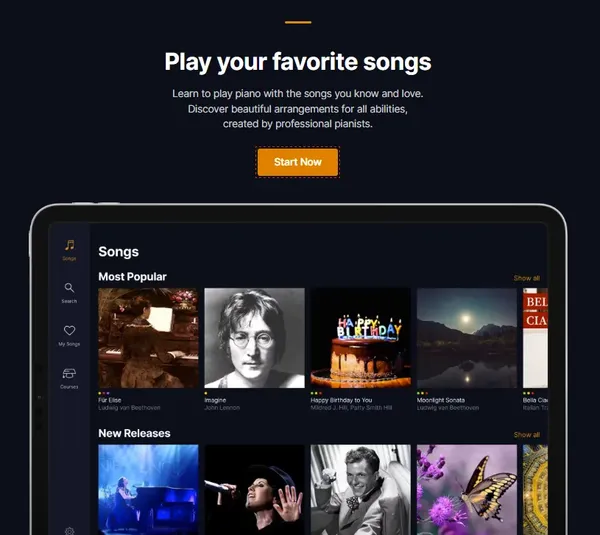
Verdict: The best pick if you mainly want to play songs you already love, on a digital or an acoustic piano.
- Price:
- Monthly $24.99 · Yearly $149.99.
- Trial:
- Free account; 7 days on yearly.
- Format:
- Song tutorials.
- Feedback:
- Wait Mode listens.
- Works with:
- Digital or acoustic piano; web, iOS, Android.
What I like
- The interface is polished
- It works with acoustic pianos
- The song library is enormous
Drawbacks
- Theory and technique coverage is thin
- It’s less structured than Piano Marvel or Playground Sessions
Flowkey's Classic plan covers its classical and public-domain songs, Premium adds pop, rock, jazz, film and game music, and a free account includes a few songs and lessons. Each song is shown as sheet music and a video of real hands, and Wait Mode listens and waits for the right notes. It works with acoustic pianos as well as digital ones, through the microphone.
Flowkey prices (US):
- Free account: a few songs and lessons
- Premium monthly plan: $24.99 a month
- Premium yearly plan: $149.99 a year
- Classic plan: $16.49 a month, or $99.99 a year
If your goal is simply "play more songs I already love," Flowkey's library does a lot of the work. The trade-off is that it teaches pieces more than it teaches piano as a skill. My Flowkey review goes deeper.
Piano by Pictures: best for visual learners
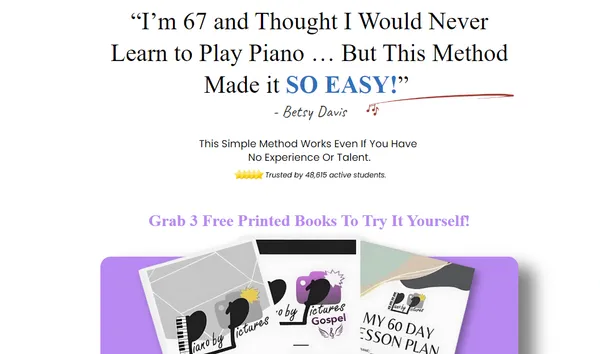
Verdict: A narrow but useful option if sheet music has never clicked for you. Read the billing terms: the free month rolls into $49 a month.
- Price:
- Monthly $49 after the free month.
- Trial:
- First month free.
- Format:
- Picture-based video lessons.
- Feedback:
- None stated.
- Works with:
- Any piano or keyboard.
What I like
- It’s fantastic for visual learners
- It simplifies concepts that trip up beginners elsewhere
- It builds creativity early
Drawbacks
- Theory depth is light early on
- At $49 a month it’s the priciest subscription here, which is a lot if you’re not the learner it’s built for
Piano by Pictures is the priciest subscription here. It teaches chords, scale patterns and melodies through pictures and diagrams instead of traditional notation, and adds new lessons every month. The "3 free books" offer asks you to pay shipping and starts the membership, so read the billing terms first.
Piano by Pictures prices (US):
- Free trial: the first month
- Monthly plan: $49 a month after the free month
It's narrow by design. If sheet music has always felt like a foreign language, the picture-first approach removes that barrier. If you already read notes, you don't need it.
Best online piano lessons by goal
The 8 picks above cover most adult beginners. If you have a specific goal, these are the ones I'd look at first:
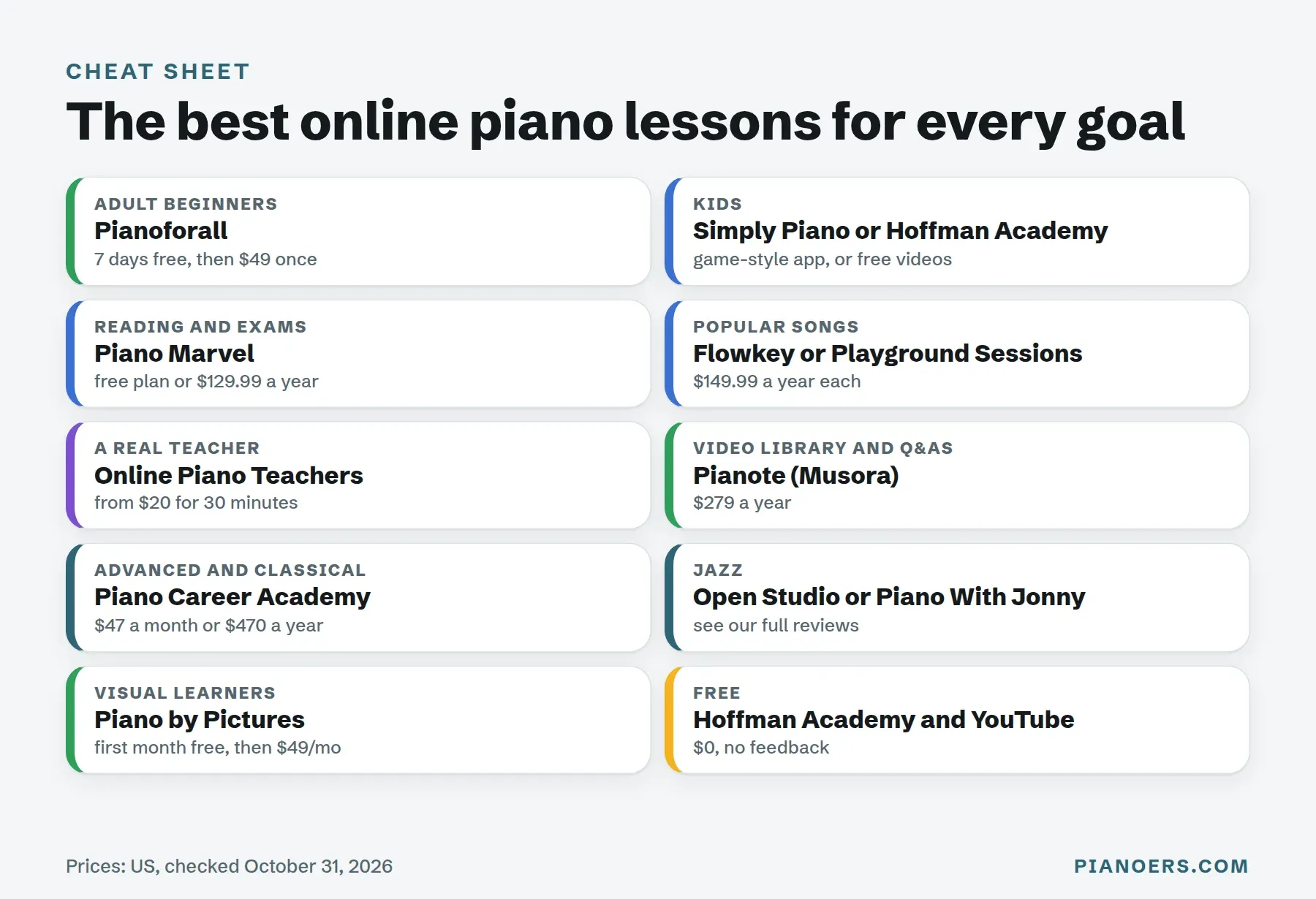
Best online piano lessons for kids
Simply Piano is my pick for children who need a game to keep practising, and its Family plan covers up to 5 profiles. Hoffman Academy is the other strong choice: free, structured video lessons made for kids and beginners, with an optional paid Premium membership. For children under about 6, an in-person or live teacher usually works better than any screen.
Best live online piano lessons with a real teacher
If you want a person, not an app, Online Piano Teachers matches you with an independent teacher for one-on-one lessons on a video call. According to its home page, it has offered lessons since 2009 and has more than 800 teachers. Its prices page lists rates starting from $20 for 30 minutes, $25 for 45 minutes and $30 for 60 minutes, and notes that some teachers charge more. Full disclosure: I teach classical piano there myself, so I know how the lessons work from the inside.
A live teacher is the only option here that can see your posture, hear your tone and fix tension before it becomes a habit. It's also the best accountability there is.
Best online piano lessons for advanced and classical players
Piano Career Academy is a library of in-depth video tutorials based on the Russian school of piano playing, from beginner to advanced repertoire. Its prices: monthly plan $47 a month; yearly plan $470 a year. For sight-reading and graded repertoire, Piano Marvel is the other one to look at. For credit-bearing study, Berklee Online offers 4- and 12-week piano and keyboard courses.
Best online jazz piano lessons
For jazz, I'd start with Open Studio or Piano With Jonny. Both focus on chords, voicings and improvising, which the general courses above barely touch. For song-by-song tutorials of popular music, HDpiano is worth a look, and for church musicians there's Worship Music Academy.
Best free online piano lessons
Hoffman Academy is the best free structured option, especially for kids. On YouTube, channels like Bill Hilton and Piano Lessons On The Web are popular with self-taught adults, and Piano Marvel's and Skoove's free tiers let you practise with real feedback for $0. The limit of free lessons is structure: you have to build your own plan. My list of the best free piano learning apps covers them all.
Which online piano lessons are right for you?
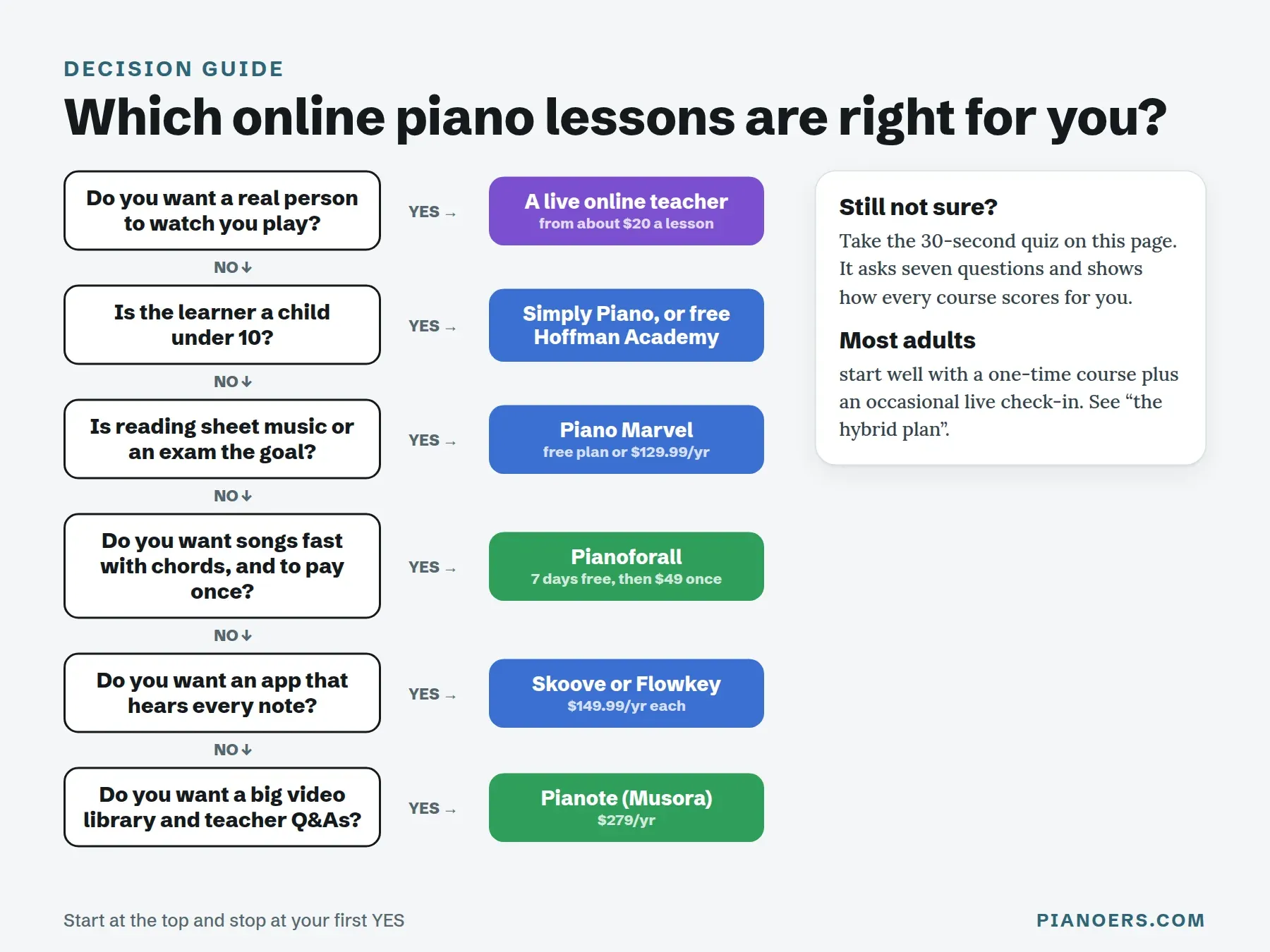
If you'd rather not take the quiz, start at the top of this flowchart and stop at your first "yes":
How much do online piano lessons cost?
Online piano lessons cost from $0 to $1,500 or more a year. Apps that listen run about $100 to $170 a year, video courses from $49 once to $279 a year, and live online teachers start at about $20 for 30 minutes, which is $1,040 a year for weekly lessons. Here is the cheapest plan you'd actually keep for 12 months, for each option:
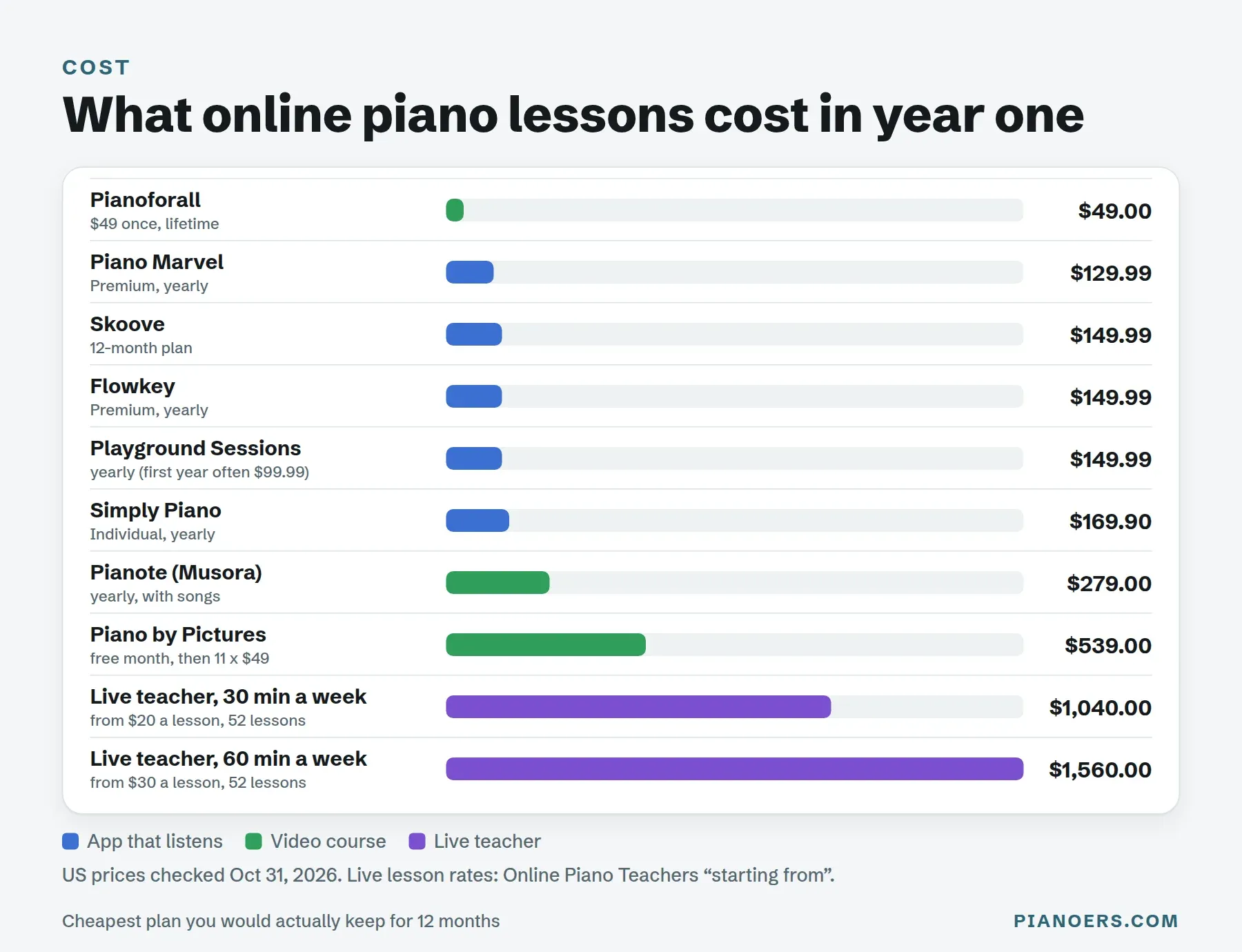
Two money tips from years of watching students sign up:
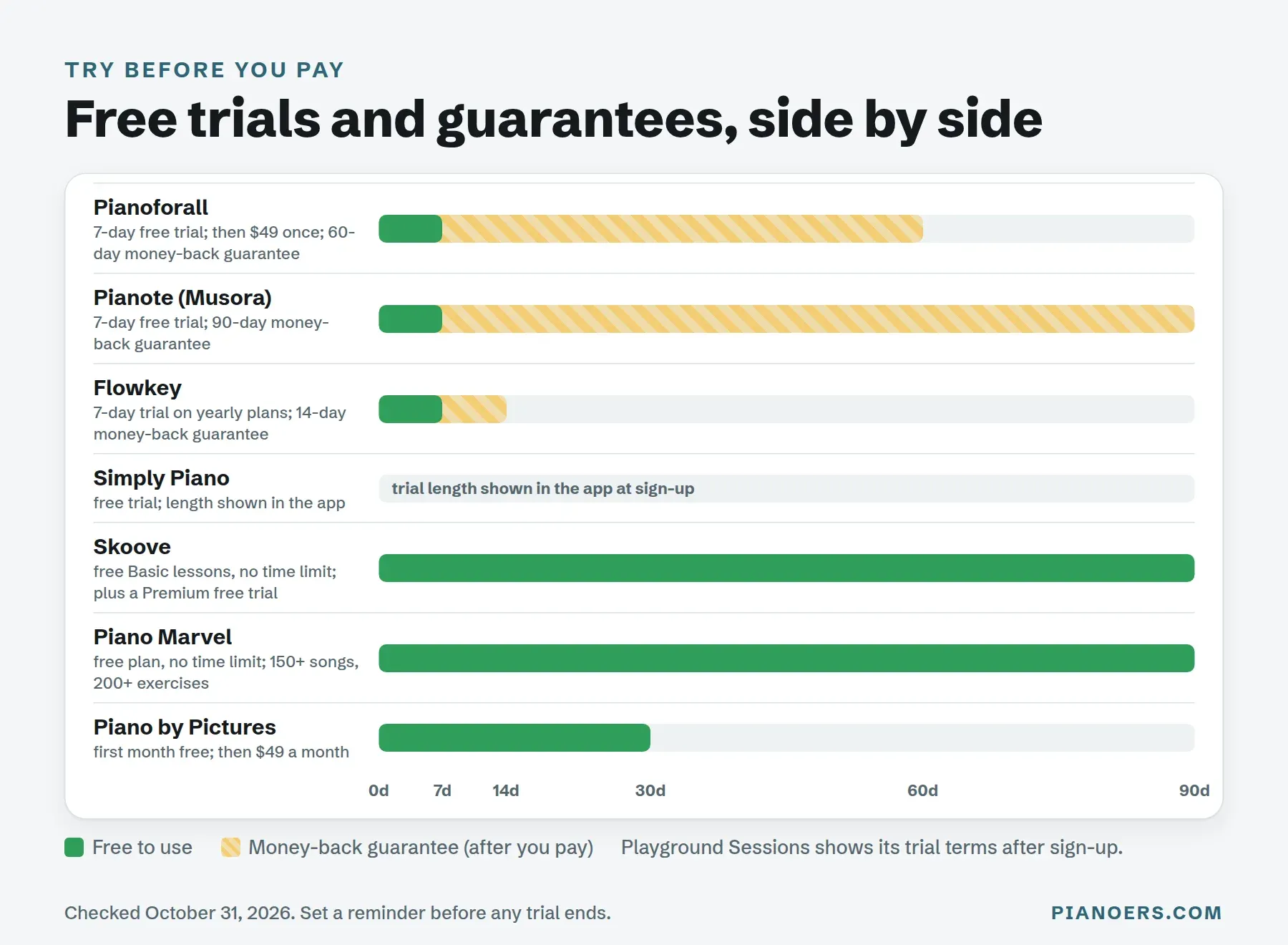
- Yearly plans are much cheaper per month, but only take one after the free trial convinces you. Skoove's monthly price, for example, is $29.99; its yearly plan works out at $12.49 a month.
- Use every free trial before you commit. Several courses let you try for free, and some have long money-back guarantees on top:
The hybrid plan: the best value in online piano lessons
Here's the approach I recommend to most adults, and the one nobody selling a single product will tell you about. Instead of choosing between a course and a teacher, combine them:
- A course or app for daily practice. It gives you a plan for every day and something new to play.
- One 30-minute live lesson a month. A teacher checks your posture, tension and rhythm, answers your questions and sets your goals for the next month.
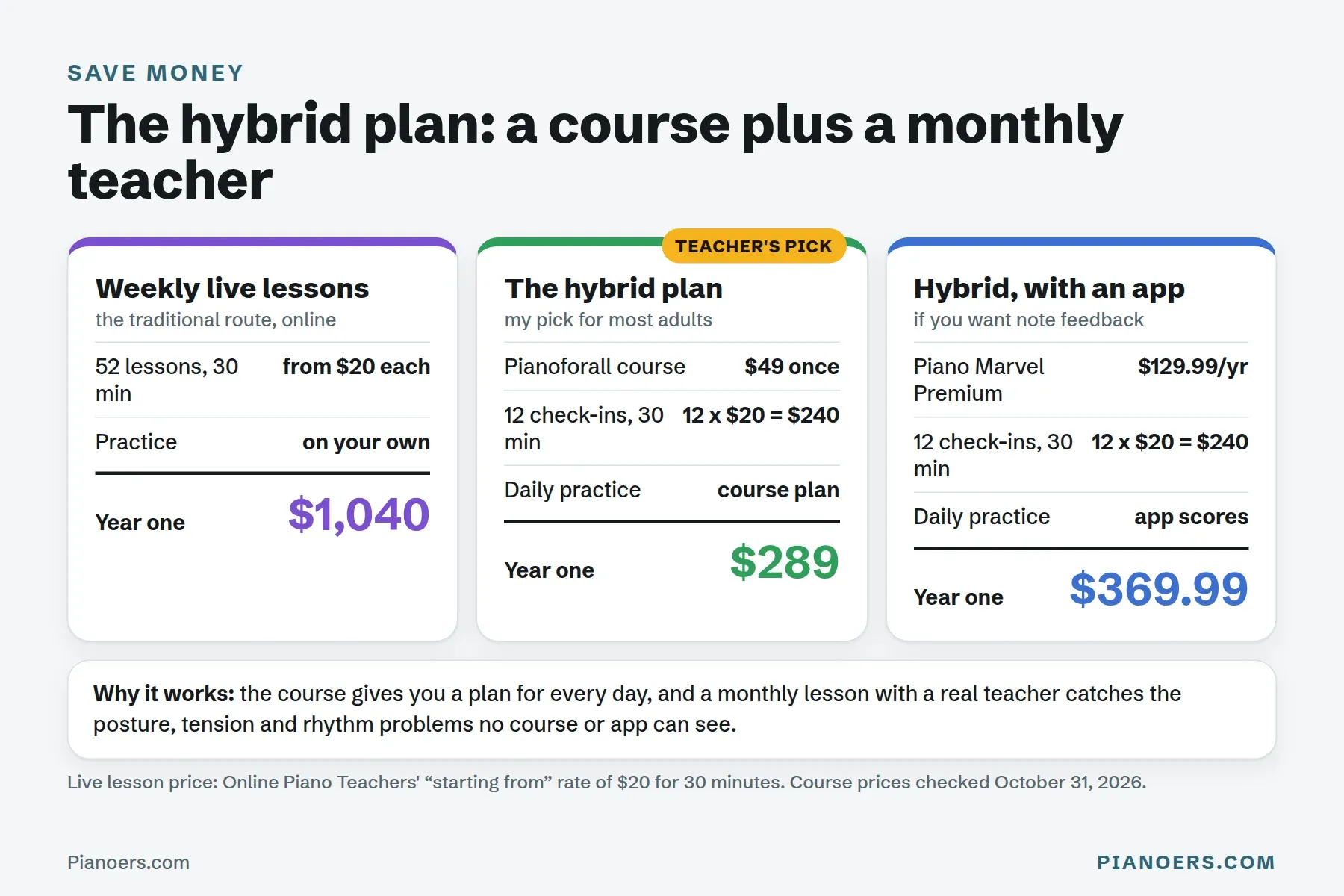
With Pianoforall ($49) and twelve 30-minute check-ins at $20, your first year costs about $289, against $1,040 for weekly 30-minute lessons. That's a cost comparison, not a promise of the same results: weekly lessons give you more teacher time. What the hybrid plan does give you is a daily structure from the course, and a teacher who checks your playing once a month, so problems are spotted sooner than if you learn alone.
Can you actually learn piano online?
Yes. You can learn piano online, especially as an adult beginner, as long as you practise regularly and get some feedback on your technique. Online courses and apps are excellent at teaching notes, chords, rhythm and songs. What they can't do is see your hands. That's why I suggest recording yourself now and then, or booking an occasional live lesson.
Online lessons have real advantages over in-person ones: they cost less, fit any schedule, and give you a choice of teachers and courses from anywhere in the world. In-person lessons still win for very young children and for anyone who needs hands-on help with posture or an injury.
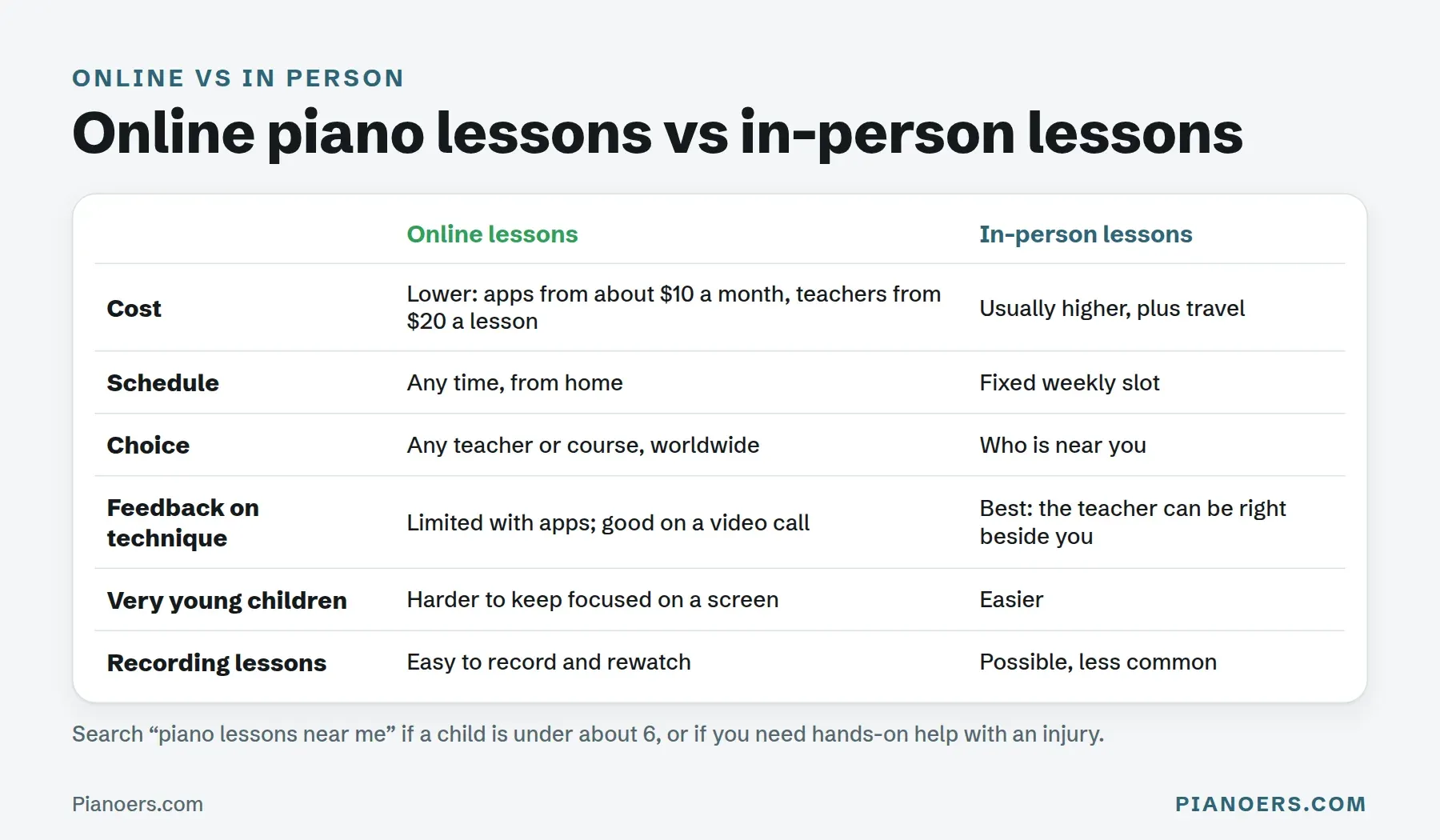
This video from Pianote gives a good overview of the pros and cons of each way of learning online:
 Play video: What's The Best Way To Learn Piano Online? Pros & Cons (YouTube)
What is the 80/20 rule for piano learning?
The 80/20 rule for piano says that a small set of skills, roughly 20%, gives you about 80% of the music you want to play. It isn't a scientific law, but it's a useful way to plan practice. As a teacher, these are the skills I'd put in that 20%:
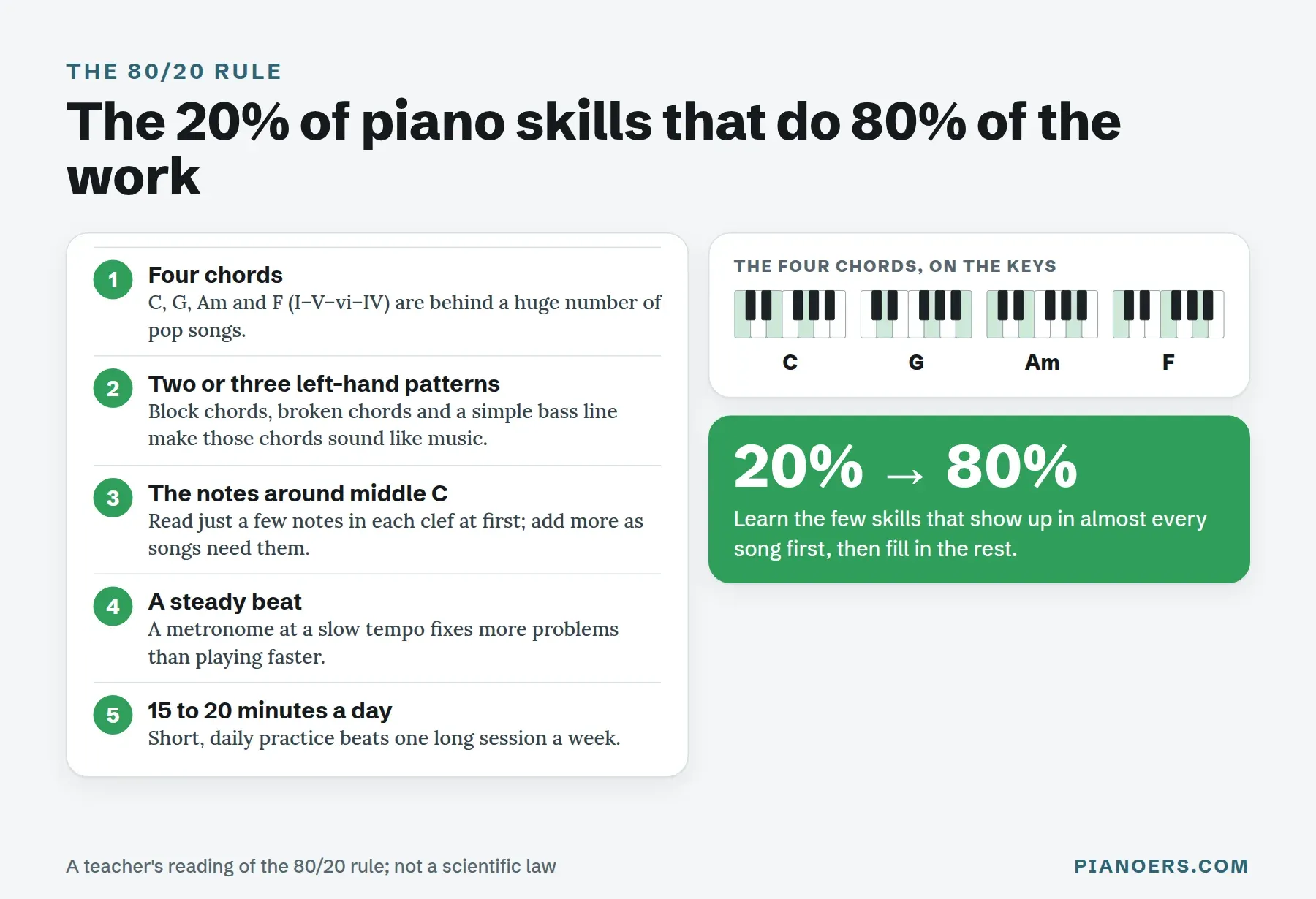
- Four chords: C, G, Am and F (I–V–vi–IV) sit behind a huge number of pop songs.
- A few left-hand patterns that turn those chords into music.
- The notes around middle C in both clefs.
- A steady beat, practised slowly with a metronome.
- 15 to 20 minutes a day, rather than one long session a week.
Chord-first courses like Pianoforall are built around exactly this idea, which is why, in my teaching experience, adults often reach their first real song sooner with them than with a reading-first method.
What is the quickest way to learn piano?
The quickest way to learn piano is short, focused daily practice with a structured course, starting with chords and simple songs rather than theory alone. Learn one hand at a time, slow down until you can play it right, and add a teacher's feedback when you can. My guide on how to teach yourself piano has a full 30-day plan, and piano basics covers the keyboard from scratch.
How I chose these online piano lessons
I judged each platform on seven factors and applied them the same way to all eight. The ranking is for a typical adult beginner, so the factors that matter most to that learner count most. This is an editorial judgement, not a points formula: if you're a different kind of learner, the quiz re-weights the same factors around your answers.
| Factor | What I looked at | Weight |
|---|---|---|
| Curriculum quality | Is there a clear order of lessons from the first day? Does it teach chords, reading and rhythm, or only songs? | High |
| Fit for the intended learner | Who it really suits (adults, kids, readers, song learners), compared with who it's marketed to | High |
| Feedback | Does it hear your notes (microphone or MIDI), does a human answer, or is there no feedback at all? | Medium |
| Price and pricing transparency | The cost of the plan you'd keep for a year, whether prices are shown before sign-up, trials and refund terms | Medium |
| Day-to-day usability | Devices it runs on, how easy the lessons are to follow, and whether it works offline or on an acoustic piano | Medium |
| Music selection | The size and range of the song library, and whether popular songs cost extra | Lower |
| Expertise behind it | Who created the lessons, and whether real teachers support learners | Lower |
Here's what the assessment of each course is based on:
- Full reviews: I've published complete reviews of Pianoforall, Simply Piano, Piano Marvel, Skoove, Pianote and Flowkey, and the verdicts here match them.
- Playground Sessions and Piano by Pictures: I haven't published full reviews of these two yet. Their details come from each company's own pages and plans in October 2026.
- Prices and trials: checked on each company's own website (US prices). Prices change, so check at sign-up.
- Not on the list: Yousician spreads its lessons across several instruments, so its piano depth doesn't match the courses above. ArtistWorks leans conservatory-style and suits a classical-only guide better.
What you need for online piano lessons
You don't need an acoustic piano. An 88-key digital piano with weighted keys, like the Yamaha P-145, works with everything on this list, and it's what I recommend. See my best beginner pianos for more options.
- A phone, tablet or computer for the lessons.
- A USB cable if you want the most accurate feedback from Piano Marvel, Playground Sessions or another app that supports MIDI.
- A good method book next to the screen. My best piano books for adult beginners are the ones I use with students.
Online piano lessons FAQ
What is the best website to learn piano online?
For most adult beginners, Pianoforall is the best value: a 7-day free trial, then $49 once for lifetime access. For an app that listens to your playing, Skoove and Flowkey are strong choices, and Piano Marvel is best for learning to read music. For a real teacher, Online Piano Teachers offers live lessons from about $20 for 30 minutes.
Can you actually learn piano online?
Yes. Online courses and apps teach notes, chords, rhythm and songs very well, and many adults learn entirely online. The one thing they can't do is see your hands, so record yourself regularly or book an occasional live lesson to check your technique.
How much do online piano lessons cost?
Online piano lessons range from free to $1,500 or more a year. Apps that listen cost about $100 to $170 a year, Pianoforall is $49 once, Pianote is $279 a year, and live online teachers start at about $20 for 30 minutes.
What are the best online piano lessons for adults?
Pianoforall is my top pick for adult beginners, because it gets you playing real songs quickly with chords and costs $49 once. Adults who want to read music should look at Piano Marvel, and adults who want a teacher should look at Pianote or live lessons.
What are the best online piano lessons for beginners?
Pianoforall, Simply Piano and Skoove are the most beginner-friendly. Pianoforall teaches chords and songs first, Simply Piano feels like a game, and Skoove hears your notes and gives instant feedback.
What are the best online piano lessons for kids?
Simply Piano is the best app for most children because its game-style lessons keep them practising. Hoffman Academy offers free video lessons made for kids and beginners. Very young children, under about 6, usually do better with a live teacher.
What are the best live online piano classes?
For one-on-one live lessons, a teacher marketplace such as Online Piano Teachers lets you choose a teacher and meet on a video call, with rates starting at about $20 for 30 minutes. Pianote, part of Musora, adds weekly live Q&As to its video lessons.
What is the 80/20 rule for piano learning?
It's the idea that about 20% of piano skills give you 80% of the music you want to play. In practice: learn four common chords (C, G, Am and F), a few left-hand patterns, the notes around middle C and a steady beat first, and practise 15 to 20 minutes a day.
What is the quickest way to learn piano?
Practise a little every day with a structured course, start with chords and simple songs, learn one hand at a time, and play slowly enough to play correctly. Adding a teacher's feedback once a month helps you avoid habits that slow you down later.
Are online piano lessons as good as in-person lessons?
For most adult beginners, online lessons work very well and cost less. In-person lessons are still better for very young children and for anyone who needs hands-on help with posture or an injury. A live online teacher gives you most of the benefits of both.
Do I need a keyboard or piano for online lessons?
Yes. I recommend an 88-key digital piano with weighted keys, which works with every course here. Apps like Simply Piano and Flowkey also work with an acoustic piano through the microphone.
How long does it take to learn piano online?
In my experience teaching adult beginners since 2001, students who practise about 20 minutes a day usually play simple melodies within 2 to 3 weeks and basic two-handed songs within 2 to 3 months. It varies a lot with age, prior experience and how regularly you practise, so treat it as a rough guide, not a promise. Consistency matters more than which course you choose.
Final thoughts
There's no single best online piano lesson for everyone, and I'd be lying if I said there was. What decides whether you're still playing in a year isn't which platform ranks first on this page. It's whether the platform matches how you learn. For most adults, that means starting with Pianoforall, adding a live check-in now and then, and practising a little every day. Any of these will get you further than the piano sitting untouched in the corner right now.

Comments ()